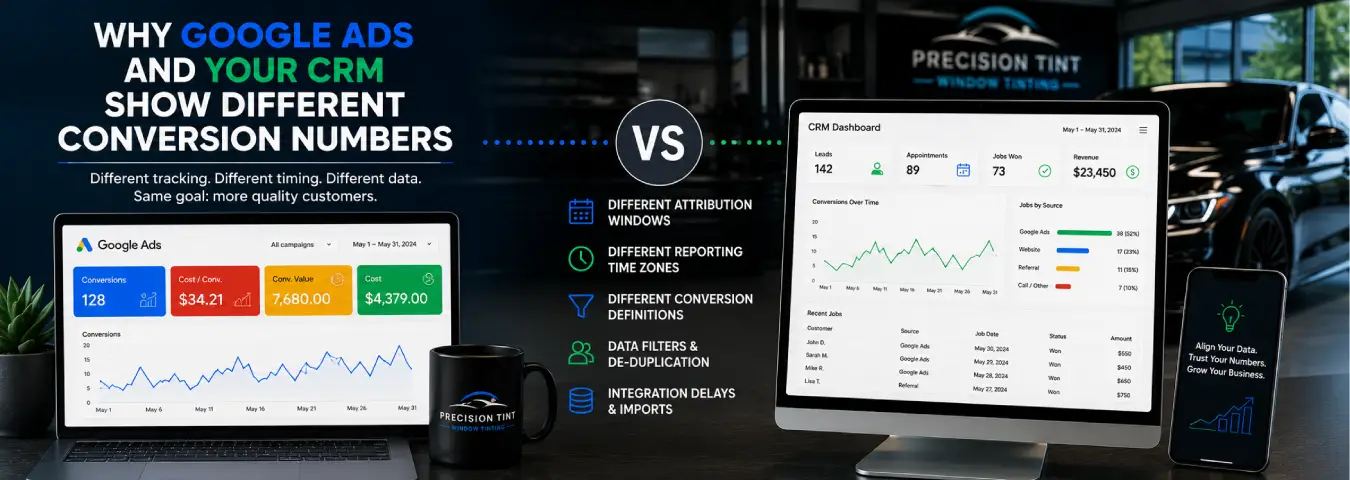
You open Google Ads and see one conversion total. Then you check your CRM and find a different number of leads, bookings, or customers. For a window tint business trying to understand marketing performance, that mismatch can make reporting feel unreliable.
Different numbers do not automatically mean one system is broken. Google Ads and a CRM often measure different stages of the customer journey, use different attribution rules, and organize conversions by different dates. The right goal is not to force every dashboard to display the same number. It is to understand what each number represents and make the systems comparable.
Google Ads and Your CRM Are Measuring Different Things
Google Ads is primarily an advertising measurement and optimization platform. Its conversion reporting connects eligible business actions back to advertising interactions according to the conversion actions and attribution settings in the account.
Your CRM is usually the operational record of leads and customers. It may contain inquiries from Google Ads alongside organic search, direct traffic, referrals, phone calls, repeat customers, social media, and other sources.
That creates the first major reason for discrepancies: a CRM may count every lead received by the business, while Google Ads counts only conversions it can attribute to eligible Google advertising interactions.
Make Sure You Are Comparing the Same Conversion
Before troubleshooting the numbers, compare the definitions.
| Metric | Possible meaning |
|---|---|
| Google Ads lead conversion | A tracked lead action attributed to Google Ads |
| CRM new lead | A new contact or inquiry stored in the CRM |
| Qualified lead | A lead that meets your shop's sales criteria |
| Booking | A prospect who schedules an appointment |
| Customer | A lead that ultimately becomes completed business |
If Google Ads is reporting quote-form conversions while your CRM report is filtered to booked appointments, those totals should not match. They represent different funnel stages.
For a tint shop, define the funnel clearly: inquiry, qualified lead, booking, completed job, and any other stage your team actually uses. Then compare like with like.
Google Ads May Credit a Conversion to the Ad Interaction Date
Date handling is one of the most common sources of confusion. Google explains that attributed conversions in standard Google Ads reporting can be organized by the impression or click time associated with the conversion. An external CRM, by contrast, will often report the date the lead, booking, or sale actually occurred.
Imagine someone clicks an ad near the end of August but books a tint appointment in early September. A CRM report grouped by booking date can place the result in September, while a standard Google Ads campaign report may associate it with the earlier advertising interaction.
Google Ads provides “by conversion time” reporting columns for comparisons that need to use the date the conversion occurred. When reconciling with CRM data, compare date logic before assuming conversions are missing.
Attribution Rules Can Change Who Gets Credit
A customer may interact with several channels before becoming a lead. They might click a Google Ad, return later through organic search, and then submit a quote form.
Attribution determines how conversion credit is assigned to marketing touchpoints. Google Ads and your CRM may not use the same attribution approach. A CRM might store the latest known source, the original source, or a custom source field, while Google Ads applies its own conversion attribution rules to eligible ad interactions.
Google's attribution documentation also notes that totals can differ even between some Google Ads attribution reports and standard campaign reports because of data-processing constraints and network coverage. The practical lesson is that “source” is not a universal field unless your organization has explicitly defined how it is calculated.
Your CRM Can Contain Leads Google Ads Cannot Attribute
A CRM records business activity regardless of whether Google Ads can connect that activity to an ad interaction. For example, your CRM may include:
- organic search leads;
- direct website inquiries;
- referrals;
- social media leads;
- repeat customers;
- calls that were not connected to a Google Ads conversion action; and
- leads whose advertising identifiers or matching data were unavailable.
If you compare all CRM leads with Google Ads conversions, the CRM total will often be broader by definition. Filter the CRM to the appropriate source and conversion stage before comparing totals.
Google Ads Can Count Actions Your CRM Does Not Treat as Leads
The discrepancy can also go in the opposite direction. A Google Ads account may be configured to count actions that the sales team would not consider legitimate leads.
Examples include a click on a phone number, a booking-button click, a form-submit button click that fires before validation succeeds, or duplicate conversion events caused by an implementation problem.
Your CRM may contain only successfully created contact records, while the advertising tag records more upper-funnel actions. Review every Google Ads conversion action and ask: What exactly has to happen for this conversion to fire?
Conversion Count Settings Matter
Google Ads conversion actions have counting settings that determine how repeated conversions are handled. Depending on the business action, you may want multiple valuable actions after an ad interaction to count, or you may care primarily about one lead outcome.
A CRM may deduplicate around a contact, email address, phone number, opportunity, or another record identifier. Google Ads and your CRM therefore may apply different logic to repeated activity from the same person.
Do not try to solve this by arbitrarily deleting data. Instead, document the counting rule in each system and decide which metric is appropriate for the business question.
Processing and Import Delays Create Temporary Differences
CRM records can appear immediately when a lead is created, while advertising conversion reporting may involve processing time. Google notes that uploaded offline conversions can take time to appear in reporting, with some identifier types taking longer than others.
This means a same-day comparison can show a discrepancy that disappears after processing. When you reconcile reports, use a stable reporting window and allow appropriate time for conversions and offline imports to be processed.
Offline Conversion Uploads Can Fail or Be Rejected
If your CRM sends qualified leads, bookings, or sales back to Google Ads, not every record is guaranteed to import successfully. Google recommends checking upload results because rejected conversions will not appear in normal conversion reporting.
Potential problems include incorrect conversion-action configuration, invalid timing, missing identifiers, mismatched data, or formatting issues. Google also provides offline-data and enhanced-conversion diagnostics to help identify implementation problems.
When the CRM shows more converted leads than Google Ads, check the import results rather than assuming every CRM outcome reached the advertising account.
Time Zones Can Shift Conversions Between Days
A CRM and Google Ads can use different time zones. A conversion late at night can therefore fall on different calendar dates in the two systems.
This issue is especially visible in daily reports and around month-end. Google specifically recommends checking time-zone differences when troubleshooting offline conversion discrepancies.
Document the time zone used by each system and normalize the reporting period when you perform a detailed reconciliation.
Lead Source Data Can Be Lost Between the Website and CRM
Accurate reconciliation depends on preserving useful attribution data as a lead moves through your systems. If the website captures a lead but the CRM does not retain the relevant source information or advertising identifiers, it becomes harder to connect later bookings and sales with the original campaign.
For Google Ads lead measurement, Google recommends retaining Google click identifiers such as GCLIDs whenever possible for offline conversion workflows. Enhanced conversions for leads can also use hashed first-party lead information to improve matching between website leads, CRM outcomes, and ad interactions.
The objective is not to store every analytics field in the CRM. Capture the identifiers and source fields needed for your measurement design, while following applicable privacy and customer-data requirements.
Enhanced Conversions for Leads Can Improve CRM-to-Ads Measurement
Google's enhanced conversions for leads is designed for businesses where an online lead later becomes a qualified lead or customer offline. The website can collect permitted first-party lead information, the CRM stores the lead, and a later converted outcome can be imported so Google can match it back to advertising interactions.
Google currently recommends enhanced conversions for leads over legacy offline conversion import workflows. As of 2026, Google has unified enhanced conversions for web and leads under a single account-level setting, and current offline upload workflows are moving toward Data Manager infrastructure.
For a window tint business, this can be useful when a prospect submits a quote form but does not become a confirmed booking until your team follows up by phone or text.
Why a Perfect One-to-One Match Is Not Always the Goal
If Google Ads and the CRM have different purposes, expecting identical totals can create the wrong troubleshooting target.
A more useful measurement design establishes a hierarchy:
- Google Ads answers which advertising interactions are producing attributed conversions and supporting campaign optimization.
- Analytics helps explain website behavior and cross-channel acquisition.
- The CRM records lead status, qualification, appointments, customers, and sales outcomes.
- Offline conversion measurement sends selected downstream outcomes back to the advertising platform when appropriate.
The systems should be connected and explainable, but they do not have to become identical databases.
How to Reconcile Google Ads and CRM Conversion Numbers
Use a controlled reconciliation process instead of comparing two headline totals.
- Choose one conversion action. Start with something specific, such as successfully submitted quote forms.
- Use the same date range. Confirm whether each report uses click date, conversion date, lead-created date, or booking date.
- Match time zones. Normalize them when necessary.
- Filter the CRM source. Compare only records relevant to the Google Ads traffic you are investigating.
- Review Google Ads conversion settings. Confirm the trigger, counting method, attribution configuration, and whether the action is included in the reporting column you are using.
- Check duplicates. Test whether one lead can fire the advertising conversion multiple times.
- Review import diagnostics. If CRM outcomes are uploaded, identify rejected or delayed records.
- Inspect unmatched leads. Look for missing click identifiers, source data, consent-related limitations, or other matching gaps.
- Document the expected difference. Once you understand why totals differ, make that logic part of your reporting process.
Build a Simple Reconciliation Table
A monthly reconciliation sheet can make discrepancies easier to diagnose:
| Check | Google Ads | CRM | Question |
|---|---|---|---|
| Conversion definition | What action fires? | What record/stage counts? | Are these the same outcome? |
| Date basis | Click or conversion time? | Lead, booking, or sale date? | Are periods aligned? |
| Source | Attributed Google Ads conversions | Which lead-source filter? | Are non-ad leads excluded? |
| Duplicates | How are repeat actions counted? | How are contacts deduplicated? | Is one person counted differently? |
| Offline outcomes | Successfully imported? | Present in CRM? | Were records rejected or delayed? |
This turns a vague “the numbers don't match” problem into a series of specific checks.
Common Mistakes When Comparing Google Ads With a CRM
Comparing all CRM leads with Google Ads conversions. The CRM may include many non-Google sources.
Comparing bookings with lead conversions. They are different funnel stages.
Ignoring date attribution. A conversion can be associated with an earlier ad interaction in standard Google Ads reporting.
Assuming every offline upload succeeded. Review upload results and diagnostics.
Using a button click as a lead. Confirm that your Google Ads conversion represents a successful business action.
Expecting instant reporting. Processing delays can create temporary gaps.
Losing attribution fields in the CRM. Preserve the identifiers and source data required for your measurement workflow.
Use the CRM as the Business Outcome Layer
For a window tint business, the CRM is most valuable when it tells you what happened after the marketing conversion. Did the lead answer? Was the inquiry qualified? Did the prospect book? Was the job completed? What revenue did it produce?
Google Ads can then be used to understand and optimize the advertising that contributed to those outcomes. When appropriate, qualified leads and converted leads can be sent back through enhanced conversions for leads so the advertising platform has a better downstream signal.
Instead of asking why two dashboards are not identical, build a measurement process that explains the relationship between them. Once conversion definitions, dates, attribution, source fields, deduplication, and offline imports are aligned, differences become easier to diagnose—and your marketing decisions become much more reliable.
Ready to grow your business?
Book a free strategy call and see what's possible.