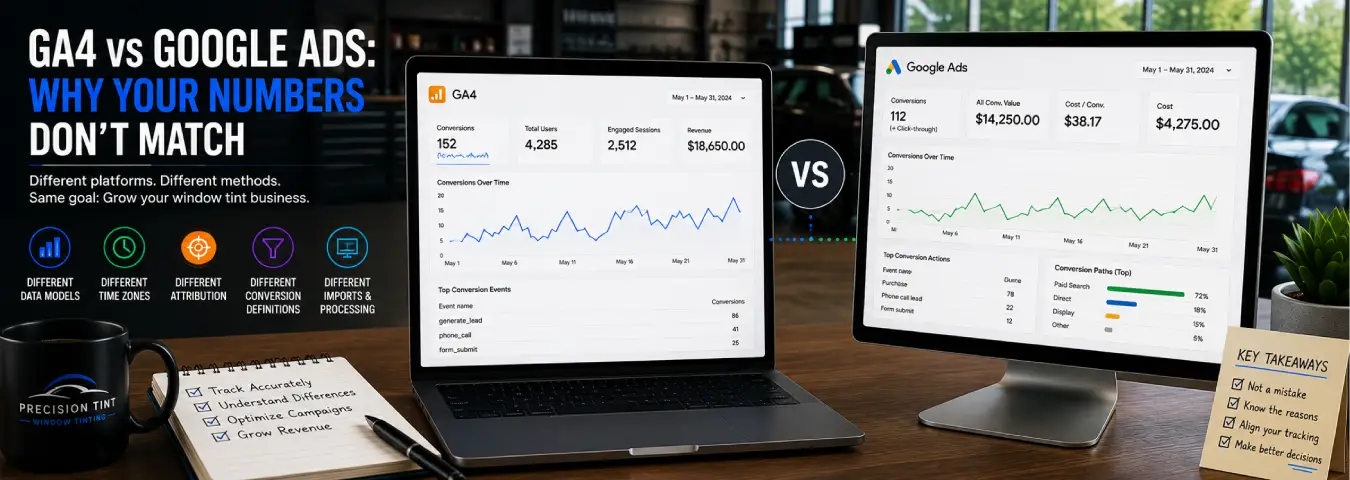
You check Google Analytics 4 and see one number for leads or conversions. Then you open Google Ads and see another. It is tempting to assume the tracking is broken, but a mismatch between GA4 and Google Ads can be completely normal.
The two platforms are designed for different reporting jobs. GA4 measures behavior across your website and marketing channels, while Google Ads focuses on advertising interactions and the conversions attributed to Google Ads. Differences in reporting dates, conversion definitions, counting settings, attribution, processing, and traffic scope can all change the totals you see.
For a window tint business, understanding those differences is important before changing tags, campaign budgets, or bidding strategies based on a discrepancy that may be expected.
GA4 and Google Ads Do Not Start With the Same Reporting Scope
GA4 is a cross-channel analytics platform. It can collect events from visitors who arrive through paid search, organic search, direct traffic, referrals, social channels, and other sources that your implementation measures.
Google Ads conversion reporting has a narrower advertising purpose. Google notes that Ads reports conversions when there are eligible Google Ads interactions associated with the conversion. A GA4 key event can therefore include activity from users who never interacted with the Google Ads account you are reviewing.
This means comparing the total number of a GA4 key event with the Google Ads Conversions column is not automatically an apples-to-apples comparison.
Key Events and Google Ads Conversions Are Related but Not Identical Concepts
Google now uses key event in Analytics for an event that represents an action important to the business. A conversion refers to an important action used for advertising measurement and optimization.
You can create a Google Ads conversion based on a GA4 key event. Google has worked to align conversion measurement between Ads and Analytics, and conversions created from Analytics key events can share data between the products. However, your reports can still differ when you compare different scopes, columns, settings, or date logic.
Before comparing totals, confirm that you are looking at the same underlying business action. A GA4 generate_lead key event should not be compared with a Google Ads column that includes phone calls, bookings, and other conversion actions unless that broader comparison is intentional.
The Date of the Conversion Can Be Reported Differently
One of the most important reasons numbers differ is reporting time.
Google Ads standard conversion reporting can associate a conversion with the date of the ad interaction that led to it. Analytics commonly reports the event on the date the event actually occurred.
Imagine a prospect clicks a tint shop's Google Ad on August 29 and submits a quote request on September 2. A standard Google Ads report can place the attributed conversion with the earlier ad interaction, while GA4 records the key event when the quote request occurs.
This can create especially noticeable discrepancies around the beginning or end of a month.
Use conversion-time columns when reconciling dates
Google recommends using columns such as Conversions (by conv. time) or All conv. (by conv. time) when you want Google Ads reporting organized by conversion time for a closer comparison with systems that use the actual conversion date.
Do not assume two reports use the same date basis simply because the date-range selector shows the same month.
Google Ads Counting Settings Can Change the Total
Google Ads conversion actions can use different counting methods. The Every setting can count multiple conversions after an interaction, while One can limit the conversion action to one conversion per ad interaction.
GA4 can still record multiple occurrences of the underlying event. Google gives an example where a person completes two lead forms and Analytics records two key events, while an imported Google Ads conversion configured to count One may report one conversion.
For a tint shop, this matters when comparing repeated quote requests, phone actions, or bookings. Check the Google Ads counting setting before treating a lower Ads total as a tracking failure.
The Conversions and All Conversions Columns Are Different
Another common mistake is comparing the wrong Google Ads column with GA4.
The Google Ads Conversions column follows the account's conversion-action configuration and includes actions designated for the relevant optimization and reporting setup. The All conversions column can include a broader set of conversion activity, including secondary actions and other supported conversion types.
If GA4 records every instance of an important event while Google Ads is showing only selected primary conversion actions, the totals can differ even when the data flow is working correctly.
Document which Google Ads column your marketing reports use and keep that definition consistent.
Attribution Can Give Different Channels Credit
Customers often interact with more than one marketing touchpoint before becoming a lead. Someone might click a paid search ad, return through another channel, and submit a quote later.
Attribution models determine how credit is assigned across those touchpoints. GA4 supports reporting attribution settings for paid and organic channels, while Google Ads applies attribution to eligible advertising interactions according to its conversion configuration.
Google's Analytics documentation provides attribution-model reports that let you compare how credit changes under different models. Google also notes that the model and reporting perspective need to be aligned when making detailed comparisons between Analytics key events and Google Ads attribution.
The practical lesson is simple: do not compare attributed channel totals until you know which attribution perspective each report is using.
Conversion Windows and Lookback Rules Matter
A person may convert days or weeks after first interacting with an ad. Google Ads conversion actions use conversion windows that determine how long after an eligible ad interaction a conversion can still be recorded.
Analytics has its own attribution and lookback configuration. If one system is eligible to credit an older interaction while the other report is using different rules, totals can diverge.
When investigating long sales cycles or customers who return later, review the relevant window settings instead of looking only at the conversion tag.
Processing Delays Can Create Temporary Mismatches
Reporting is not always instantaneous. Google advises allowing time for data synchronization and processing between Analytics and Google Ads. Imported Analytics conversion information can also take time to appear in Google Ads.
A comparison made immediately after a conversion, account link, or major tracking change may therefore show a temporary difference. Google recommends allowing 24–48 hours for synchronization and processing in some discrepancy troubleshooting scenarios.
For routine reconciliation, compare stable periods rather than repeatedly diagnosing today's incomplete numbers.
Invalid Traffic Filtering Can Affect the Comparison
Google Ads applies systems designed to identify invalid advertising interactions. Google notes that some conversion events visible in Analytics can be filtered when imported into Ads because they are associated with activity its invalid-click systems identify as suspicious or invalid.
This is another reason the platforms should not be expected to behave as identical databases. Their measurement and advertising-protection responsibilities are different.
Clicks and Sessions Should Not Match Either
Conversion discrepancies are not the only mismatch you may notice. Google Ads reports ad clicks, while GA4 reports sessions and users. These are different metrics.
One person can click an ad and create a session, return later without another paid click, or encounter technical conditions that prevent Analytics from recording the landing-page visit. Google also lists redirects, missing tags, auto-tagging issues, browser settings, and page-loading problems among possible reasons for click and session discrepancies.
Do not use a clicks-versus-sessions mismatch by itself as proof that conversion tracking is incorrect.
Auto-Tagging and Landing-Page Tracking Can Cause Real Problems
Not every discrepancy is expected. Some mismatches do indicate an implementation issue.
Google recommends checking that auto-tagging and the Google Ads–Analytics connection are configured correctly, that landing pages contain the appropriate tracking, and that redirects do not remove campaign information before Analytics can collect it.
If a landing page is missing the Google tag, fails to load the tag, or strips important URL parameters during a redirect, GA4 may lose information needed to associate the session with the campaign.
Test actual ad landing-page templates, not only the homepage.
Consent and Browser Limitations Affect Observed Data
Users can have browser or privacy settings that limit what Analytics can collect. Consent configurations can also change the amount and type of observable data available to measurement systems.
GA4 can use modeled key events in eligible circumstances to estimate activity that cannot be observed directly because of privacy or technical limitations. Google notes that attributed channel data can continue to update while processing and modeling occur.
Because privacy-aware measurement can involve observed and modeled data, avoid treating every short-term difference as a simple tag-counting problem.
A Practical GA4 vs Google Ads Reconciliation Checklist
When your numbers do not match, investigate in a consistent order:
- Choose one business action. Compare the same quote form, booking, call, or sale conversion in both platforms.
- Check the traffic scope. Make sure GA4 is filtered to the relevant Google Ads traffic if you are comparing it with Ads.
- Check the date basis. Compare event time with Google Ads conversion-time reporting where appropriate.
- Review counting settings. Confirm whether the Ads conversion counts One or Every.
- Check the Ads column. Know whether you are using Conversions or All conversions.
- Align attribution. Understand which model and channel scope each report uses.
- Review conversion windows. Make sure older conversions are eligible under the settings being compared.
- Allow processing time. Avoid diagnosing incomplete same-day data.
- Verify tagging. Test the conversion trigger, landing pages, redirects, and Google Ads/GA4 connection.
- Document the expected difference. Once the reason is known, make it part of your reporting methodology.
Use a Comparison Table for Monthly Reporting
| Check | GA4 | Google Ads |
|---|---|---|
| Primary purpose | Cross-channel website/app behavior | Advertising performance and optimization |
| Important action | Key event | Conversion action |
| Traffic scope | Can include multiple channels | Eligible Google Ads interactions |
| Date comparison | Event/conversion occurrence | Standard reporting can associate with ad interaction; conversion-time columns are available |
| Counting | Event occurrences according to Analytics measurement | Conversion action can use One or Every |
| Attribution | Analytics reporting attribution settings | Google Ads conversion attribution settings |
This table is not a substitute for checking your account configuration. It is a reminder that the platforms answer overlapping but different reporting questions.
When a Difference Should Concern You
Small or explainable differences can be normal. Investigate more aggressively when you see a sudden change after a website update, a major persistent gap in a conversion that previously reconciled well, zero GA4 activity from an active paid campaign, duplicate conversions, or a conversion firing before the intended business action succeeds.
Use Google Tag Manager Preview mode or your relevant tag-debugging tools, GA4 debugging and realtime reporting, and Google Ads conversion diagnostics to trace the event through the measurement stack.
Change one thing at a time where practical so you can identify what actually fixes the discrepancy.
Which Number Should a Window Tint Business Trust?
The answer depends on the question.
Use GA4 when you need to understand website behavior, cross-channel acquisition, user journeys, and key events across your digital property. Use Google Ads when you need to evaluate and optimize the conversions attributed to your advertising campaigns. Use your CRM or booking system to determine what ultimately happened to the lead, including qualification, appointments, completed jobs, and revenue.
These systems work best as layers rather than competitors. GA4 explains behavior, Google Ads explains advertising performance, and the CRM explains the business outcome.
Make the Difference Explainable, Not Necessarily Zero
The goal of measurement is not to force GA4 and Google Ads to display identical numbers under every report. It is to know why they differ and to make sure each system is accurately measuring the role it is supposed to play.
Start by aligning the conversion definition, date logic, counting settings, attribution perspective, and reporting scope. Then verify the technical implementation and allow for processing. Once those differences are understood, your window tint business can use both platforms with much more confidence when evaluating campaigns, leads, bookings, and revenue.
Ready to grow your business?
Book a free strategy call and see what's possible.