A window tint shop can generate leads from Google Ads, organic search, phone calls, quote forms, booking pages, social campaigns, and referrals. The reporting problem starts when those leads enter different systems and the original marketing source disappears before the job is booked or completed.
A complete lead tracking setup solves that problem by connecting the customer journey from acquisition to revenue. Instead of measuring only clicks or form submissions, you create a consistent record of where the lead came from, what the prospect did, whether the lead qualified, whether an appointment was booked, and what happened after the sale.
This guide lays out a practical tracking architecture for a window tint shop using website analytics, conversion tracking, call measurement, and CRM data.
What a Complete Lead Tracking System Should Answer
Your tracking should make it possible to answer business questions such as:
- Which channels and campaigns generate leads?
- Which landing pages produce successful quote requests?
- Which ads generate meaningful phone calls?
- Which leads become qualified prospects?
- Which sources produce booked appointments?
- Which leads become completed tint jobs?
- How much revenue is associated with each source?
No single platform has to answer every question. The goal is to make the platforms work together with clear responsibilities.
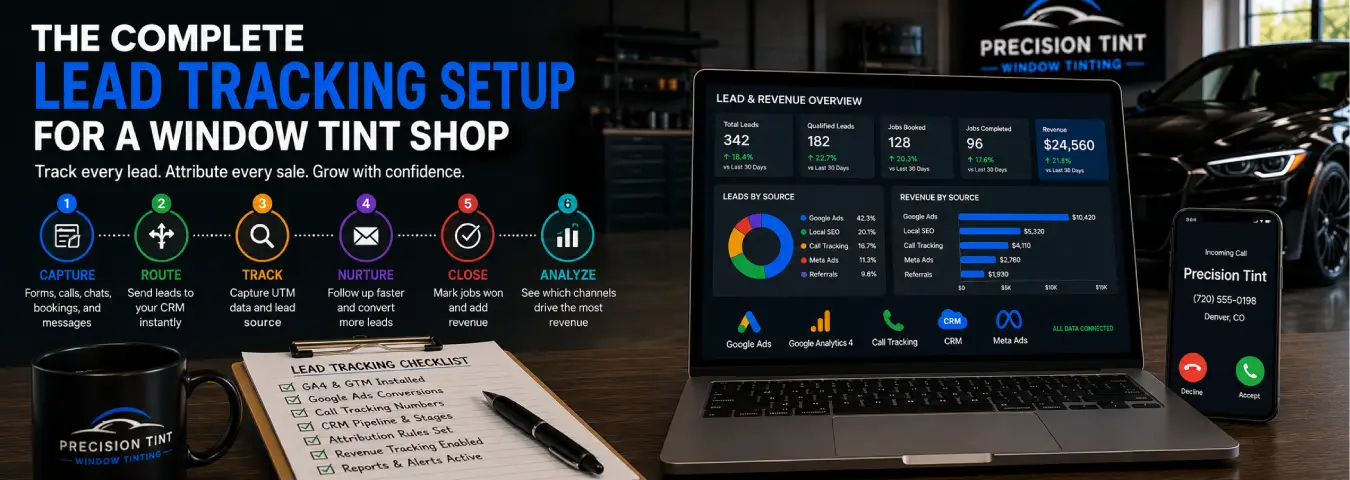
The Lead Tracking Architecture
A practical setup can be organized into six layers:
| Layer | Primary job |
|---|---|
| Website and landing pages | Capture visitor actions and lead submissions |
| Google Tag Manager or site tagging | Send accurate measurement events |
| GA4 | Analyze website behavior and important events |
| Advertising platforms | Attribute conversions to eligible ad interactions |
| Call tracking | Measure phone leads and connect calls to sources |
| CRM / booking system | Record qualification, bookings, customers, and revenue |
Each layer should use consistent conversion definitions so the same action is not accidentally labeled as several different outcomes.
Step 1: Define Your Lead and Sales Stages
Do this before creating tags. A tracking implementation becomes confusing when the business has not agreed on what a lead, booking, or customer actually means.
A tint shop might use stages such as:
- New lead: a valid new inquiry has entered the system.
- Contacted: the team has reached or attempted to reach the prospect.
- Qualified: the inquiry fits the shop's sales criteria.
- Quoted: a price or service recommendation has been provided.
- Booked: an appointment has been confirmed.
- Completed: the tint job has been performed.
- Lost: the opportunity did not become a customer.
These definitions become the foundation for CRM reporting and downstream advertising measurement.
Step 2: Create a Measurement Plan Before Building Tags
List the customer actions you need to measure and decide where each one should be recorded.
| Action | Measurement role | Likely destination |
|---|---|---|
| Quote form success | Lead | GA4, Google Ads, CRM |
| Phone-number click | Call intent | GA4 |
| Qualified phone call | Phone lead | Call tracking / Google Ads / CRM |
| Booking confirmed | Appointment | GA4, Google Ads, booking system, CRM |
| Lead qualified | Downstream sales outcome | CRM, optional advertising import |
| Job completed | Customer outcome | CRM / sales system, optional advertising import |
| Revenue recorded | Financial outcome | CRM / sales system |
Keep upper-funnel interactions separate from completed outcomes. A phone-number click is not the same as a connected sales call, and a booking-button click is not a confirmed appointment.
Step 3: Install a Reliable Website Tagging Layer
Google Tag Manager can provide a central way to deploy and manage analytics and advertising tags. In Tag Manager, triggers listen for events such as page views, clicks, and form submissions and determine when associated tags should fire.
Use descriptive names for tags, triggers, and variables so another person can understand the container later. A naming structure such as GA4 - Event - Quote Form Success is more useful than a generic label such as Tag 12.
Publish changes only after testing the relevant customer journey.
Step 4: Track Successful Quote Form Submissions
The strongest form conversion is a confirmed successful submission, not merely a click on the submit button.
Google Tag Manager provides a Form Submission trigger. Google's documentation notes that its Check Validation option can restrict firing to successfully sent forms, and Google recommends specifying conditions for the form you intend to measure.
Modern forms do not always use a traditional browser form submission. When a site's normal submit behavior is overridden, Google recommends a custom-event trigger as an option. A developer can expose a success event through the data layer after the application confirms that the lead was accepted.
That creates a cleaner sequence:
- The prospect completes the quote form.
- The website validates the information.
- The server or form system accepts the lead.
- A success state or data-layer event occurs.
- The GA4 and advertising conversion tags fire.
- The lead is created in the CRM.
Test error states to make sure failed or incomplete submissions do not count as leads.
Step 5: Configure GA4 Around Meaningful Events
GA4 should help you understand the behavior that leads to inquiries and bookings. Google distinguishes normal events from key events, which represent actions particularly important to the business.
For a lead-generation site, Google's own documentation uses generate_lead as an example of an event that can be marked as a key event when a user completes a lead form. A Google Ads conversion can then be created from an Analytics key event in a linked account.
A tint-shop GA4 implementation might include:
- successful lead generation;
- confirmed booking;
- phone-link clicks;
- booking-flow starts;
- important service-page engagement where it has a clear analytical purpose; and
- other business-specific actions that help explain the funnel.
Do not mark every interaction as a key event. Reserve that designation for outcomes you genuinely use to evaluate performance.
Step 6: Configure Google Ads Conversion Actions
Google Ads should receive the conversion actions you want to use for campaign measurement and, where appropriate, bidding.
Separate conversion actions by business meaning. For example, a quote lead, a phone lead, and a confirmed appointment can each have their own definition. This makes it easier to diagnose campaign quality and avoid treating a weak intent signal as equivalent to a completed lead.
If you create a Google Ads conversion from a GA4 event, confirm that the event definition, counting behavior, and optimization role match your reporting plan.
Step 7: Track Phone Leads, Not Just Phone Clicks
Phone-number clicks are useful website events, but they cannot tell you whether the call connected or whether the caller became a legitimate lead.
Google Ads call reporting can use Google forwarding numbers for supported call assets and ads, providing information such as call duration and whether the call connected. Google also supports website call conversion tracking for eligible setups, where a forwarding number can replace the number shown to visitors after an ad click and calls can be counted as conversions based on a minimum duration.
For a broader multi-channel view, a third-party call-tracking platform may be used when it fits your business and privacy requirements. Whichever system you use, the ideal phone lead record should connect the call to the marketing source and, when possible, the CRM contact.
A duration threshold can reduce obviously short calls, but duration alone does not prove lead quality. CRM qualification remains valuable.
Step 8: Send Every Valid Lead Into the CRM
The CRM becomes the business-outcome layer of the tracking setup. Forms, calls, bookings, chats, and other meaningful inquiries should create or update records in a consistent way.
Useful fields may include:
- lead creation date;
- lead source and medium;
- campaign;
- landing page;
- lead type;
- advertising click identifiers when available and appropriate;
- contact information;
- lead status;
- booking date;
- job status; and
- completed revenue.
Do not collect fields merely because they are technically available. Store what your measurement and sales process genuinely needs, and handle customer information according to applicable privacy and consent requirements.
Step 9: Preserve Google Ads Attribution Data
If Google Ads is an important acquisition channel, make sure the website and CRM workflow preserve the information required for downstream measurement.
Google recommends enabling auto-tagging for enhanced conversions for leads implementations. Google also recommends continuing to include GCLIDs with uploaded events whenever possible. When a Google tag is used for enhanced conversions for leads, it can collect click identifiers automatically, but existing GCLIDs should still be retained and imported when available.
Test redirects, form integrations, and CRM automations to make sure attribution data does not disappear between the landing page and the lead record.
Step 10: Connect Qualified Leads and Sales Back to Google Ads
A website conversion tells Google Ads that an inquiry happened. It does not automatically tell the platform whether the lead qualified, booked, or became a customer.
Enhanced conversions for leads is designed to connect online leads with later offline outcomes using first-party lead data and available advertising identifiers. Google currently recommends using enhanced conversions for leads with Google Ads Data Manager rather than relying on legacy offline conversion import workflows.
As of 2026, Google has combined enhanced conversions for web and leads under a unified account-level setting. Google has also moved current offline-conversion and enhanced-conversions-for-leads upload workflows toward the Data Manager API. Older implementation tutorials may therefore describe workflows that are no longer preferred.
For a tint shop, useful downstream actions could include a qualified lead, confirmed booking, or completed customer when those statuses are recorded reliably in the CRM.
Step 11: Connect Booking Tracking
If customers schedule appointments online, measure the confirmed booking state rather than only the click that opens the booking tool.
If the booking happens on your own site, use a confirmation page or reliable success event. If the booking happens on another domain, determine whether the scheduling platform can preserve attribution and send the confirmed outcome back through an integration, return event, webhook, or other supported method.
If the platform cannot provide confirmation data, label an outbound booking click accurately as booking intent rather than a completed appointment.
Step 12: Add Revenue to Completed Jobs
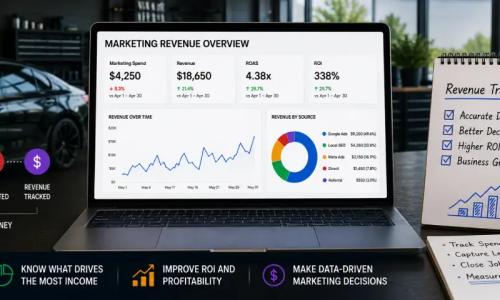
Lead tracking becomes much more useful when it reaches the financial outcome. After a job is completed, record the final job value in the CRM or connected sales system.
This makes it possible to compare channels using metrics such as:
- cost per lead;
- cost per qualified lead;
- cost per booking;
- lead-to-booking rate;
- lead-to-customer rate;
- revenue by source;
- return on ad spend; and
- marketing ROI when the necessary cost and profit data are available.
Use completed values consistently. A quote or scheduled price should not automatically be reported as completed revenue if the job can change or cancel.
Step 13: Create a Source-of-Truth Reporting Model
Different systems should answer different questions.
| System | Best question |
|---|---|
| GA4 | How do visitors behave and which channels contribute to important website actions? |
| Google Ads | Which advertising interactions are producing attributed conversions and value? |
| Call tracking | Which sources are generating measurable phone activity? |
| CRM | Which leads qualified, booked, became customers, and produced revenue? |
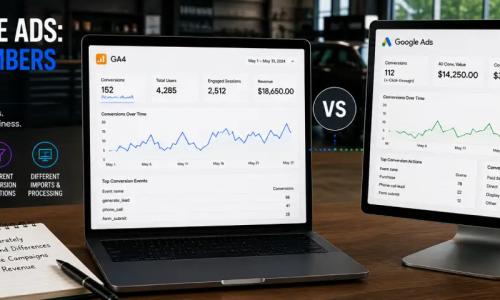
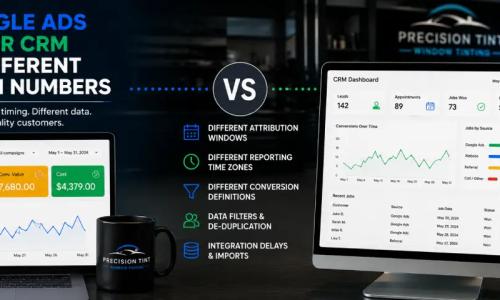
Do not expect all four systems to display identical totals. Instead, document their definitions and build reconciliation checks that explain the differences.
Step 14: Test the Entire Lead Journey
Do not stop testing when a tag appears in a debugging tool. Test the business workflow from beginning to end.
- Visit a controlled landing page.
- Submit a valid test lead.
- Confirm the website records the success only once.
- Verify the GA4 event.
- Verify the relevant advertising conversion setup.
- Confirm the CRM record was created with the expected source data.
- Move the test lead through qualification and booking stages.
- Test any offline outcome import or CRM integration.
- Confirm duplicate submissions and failed forms behave correctly.
- Repeat important tests on mobile devices.
Also test after website redesigns, form replacements, booking-system changes, consent updates, CRM migrations, or major tag changes.
Common Lead Tracking Mistakes
Tracking submit-button clicks instead of successful forms. A click can occur even when validation fails.
Counting a phone click as a qualified call. Phone intent and a real sales conversation are different outcomes.
Using one generic conversion for every lead type. Separate actions make reporting easier to understand.
Losing campaign data before the CRM. Test the complete transfer from landing page to lead record.
Stopping measurement at the lead. Qualification, bookings, customers, and revenue reveal whether lead volume is actually valuable.
Importing every CRM status as a primary conversion. Choose downstream outcomes that genuinely support campaign decisions.
Following outdated Google Ads offline-import instructions. Current enhanced-conversion workflows use updated account-level settings and Data Manager infrastructure.
Never reconciling systems. GA4, Google Ads, call tracking, and CRM data can differ for legitimate reasons, but unexplained gaps should be investigated.
A Practical Implementation Order
If you are building the system from scratch, implement it in stages rather than trying to connect everything at once:
- Define lead and sales stages.
- Set up accurate quote-form and booking-success tracking.
- Configure GA4 and Google Ads conversion measurement.
- Add reliable phone tracking.
- Standardize CRM source fields and lead stages.
- Preserve advertising attribution data.
- Record qualified leads, bookings, completed jobs, and revenue.
- Add enhanced conversions for leads or other supported downstream integrations where appropriate.
- Build a reporting dashboard around agreed definitions.
- Audit and test the system regularly.
This order gives you useful data early while creating a path toward deeper revenue attribution.
Build Tracking Around the Customer, Not the Dashboard
The best lead tracking setup for a window tint shop is not the one with the most tags. It is the one that can reliably follow a real prospect from marketing source to inquiry, booking, completed job, and revenue.
Define the funnel first, track successful outcomes rather than button clicks, preserve attribution as leads enter the CRM, measure phone and booking paths, and connect downstream results back to advertising when the data is reliable. With those pieces in place, your marketing reports can move from counting activity to explaining which channels actually create valuable customers.
Ready to grow your business?
Book a free strategy call and see what's possible.